Subscriptions and Promo Codes: What to Check Before You Sign Up
Subscriptions and Promo Codes: What to Check Before You Sign Up

A promo code on a subscription is a discount on the first payment or the first few, not a permanent price. The real cost is set by what happens when the offer ends: the renewal rate, the billing period and how you cancel. Read those three things before you enter the code, and use a code that has been checked before it reaches you. At CouponHub we verify the store, the code’s validity and the discount details before a code is published, so the only unknowns left are the subscription’s own terms, which this guide shows you how to read.
TL;DR
- A subscription promo code usually changes the price of the first payment or the first billing periods. After that, the service typically renews at its standard rate.
- Before you apply a code, find four things: the renewal price, the length of the offer, the cancellation deadline and whether the offer is limited to new customers.
- Plan on one code per order. Most checkouts accept a single promo code, and subscription offers often cannot be combined with other promotions.
- Confirm the discounted total on the checkout screen before you pay. If it does not match the offer, stop and contact support with a screenshot.
- Put the renewal date in your calendar the day you sign up.
Table of Contents
- How a promo code works on a subscription
- Static and personal codes
- The four terms to find before you apply a code
- Limits that cause codes to fail
- How to apply a subscription code and confirm it worked
- Can you combine a subscription code with other offers?
- Where to find a code worth using
- A worked example: the promo that costs more than it saves
- Smart habits for frequent subscribers
- Where CouponHub fits
- Our perspective
- FAQ
- Sources
How a promo code works on a subscription
A promo code is a short string of letters and numbers that you enter at checkout to unlock an offer, such as a lower price, free shipping or a bonus item. The store’s system checks that the code is valid and that your order meets its conditions, then shows the adjusted total before you pay. Stripe’s guide for businesses describes the rules that sit behind a code: an expiration window, usage limits, a minimum purchase, who is eligible and one code per order.
On a one-time purchase, that is the whole story. You pay less once. On a subscription, the code interacts with a billing schedule, and that is where shoppers get surprised. The same code can mean three quite different things:
- A discount on the first payment only. CoinGecko’s help page says its code applies only to the first payment and cannot be added to an existing subscription. If you begin with a free trial, the discount applies to the amount charged when the trial ends.
- A discounted rate for a set promotional period. The New York Times’ Terms of Sale say a promotional rate is charged for the relevant periods, then the subscription renews automatically at the full rate.
- A locked-in rate for as long as you stay subscribed. Membership.io’s documentation describes a coupon that sets a $197 plan at $97 for as long as the subscription remains active. This is the best case, and it depends on how the seller set up the coupon.
The code itself looks identical in all three cases. The difference is in the terms, so that is where to look.
Static and personal codes
Promo codes come in two types. Klaviyo’s glossary explains that static codes can be used and shared by any customer, while dynamic codes are specific to one customer and cannot be shared. Dynamic codes are often triggered by an action such as registering an account, joining an email list or making a first purchase.
This matters for subscriptions. A code from your welcome email is probably personal, and a code you see on a coupon page is probably a static one that any shopper can try. If a static code is meant for new customers only, the checkout will reject it for an existing account, and no amount of retyping will change that.
The four terms to find before you apply a code
Every subscription offer has fine print. You do not need to read every word of it. You need to find four answers.
1. What is the renewal price?
The renewal price is the number that decides whether the deal is a deal. OpenAI’s help center says a ChatGPT Plus subscription renews at the standard rate after its promotion ends. Monthly offers renew monthly, and annual offers renew annually. The New York Times terms work the same way.
A quick test: take the full renewal price and ask whether you would sign up at that price without the code. If yes, the code is a bonus. If no, you are really buying a short trial that you will need to cancel.
2. How long does the offer last?
Offers are defined in billing periods, not calendar dates. “50% off your first year” and “50% off your first month” read almost the same in an ad, and they are very different. Note the length, and note whether it covers a free trial, a discounted period or both.
3. When and how do you cancel?
Many services need notice before the renewal date. OpenAI says to cancel at least 24 hours before renewal to avoid a charge. The New York Times says you must cancel before the promotional period ends to avoid the full rate. Find the cancellation page before you subscribe, so you know it exists and how many steps it takes.
4. Is there a commitment hidden in the code?
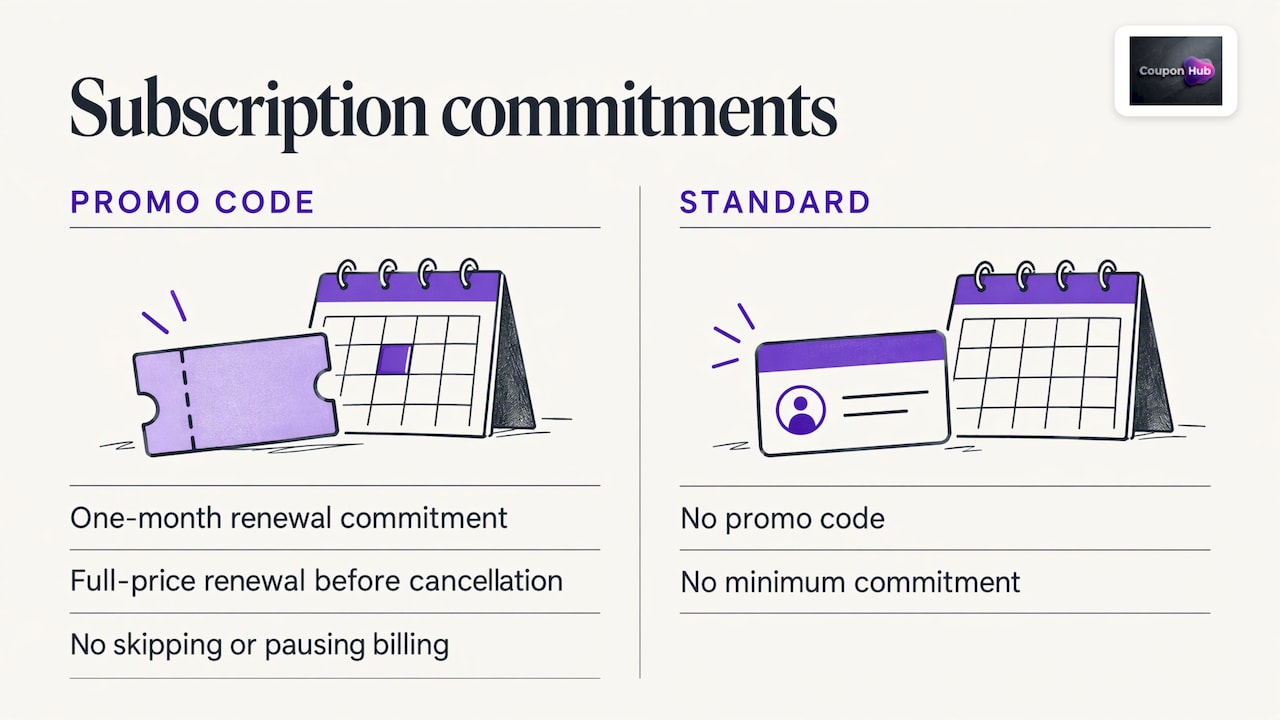
Book of the Month is a useful example. Its help center explains that enrolling with a promotional code such as a $9.99 first month creates a one-month renewal commitment. You must renew at full price at least once before you can cancel, and you cannot skip or pause billing during it. A standard subscription without a promo code has no minimum commitment.
The consumer group Truth in Advertising looked at the same offer in 2025. It found that the advertised $9.99 price required a promo code and applied only to the first book, and that using the code meant agreeing to renew for at least one more month. Consumers complained that they had not been told about the two-month requirement. The lesson is not that every offer hides something. It is that a code can change the membership terms, not just the price, so read the terms that appear next to the code.
Limits that cause codes to fail
The Seattle Times reported in a guide to finding promo codes that codes work only about a third of the time on average. The common reasons are expiration, exclusions, non-transferability and codes that simply do not work. It also notes that codes can be limited to one use, require a minimum spend or be unique personal codes.
On subscriptions, the usual failure points are these:
- New customers only. The New York Times permits only one free trial or promotional rate offer per customer. OpenAI says that once a subscription is canceled, the same promo code cannot be reused, and reactivating will not restore the promotional price.
- Wrong order type. DailyWire+'s help center says codes are applied when you create your account and start a subscription, and do not apply to gift memberships or upgrades unless stated.
- Wrong place to enter it. Some services only take a code at sign-up, and others have a separate field such as “Add promotion code” in the payment form. Once you have paid, it may be too late.
- An expired window. If the offer has an end date, the code stops working after it, even if it is still listed somewhere.
For the mechanics of entering a code on the web and in apps, our guide to applying promo codes at checkout covers the screens step by step.
How to apply a subscription code and confirm it worked
- Open the sign-up page and the terms first. Look for the renewal price, the offer length and the cancellation rules, using the four questions above.
- Start the sign-up with the plan the offer names. A code for an annual plan will not always work on a monthly one.
- Enter the code in the field provided. On DailyWire+, for example, you select “Have an offer code?” below the ZIP code field, enter the code and the discount is reflected in the total.
- Check the total before you pay. OpenAI advises confirming that the discount or trial is reflected, for instance that the price shows $0.00 for a free trial. If the checkout does not show the expected price, do not complete the purchase. Contact support with screenshots.
- Save the confirmation email. It is your record of the price you were promised.
- Set a reminder. Add the renewal date, or the day before the cancellation deadline, to your calendar.
If the code is rejected, check for stray spaces, then check whether it is limited to new customers or to a different plan. Our guide to checking coupon validity before you check out goes through the other causes.
Can you combine a subscription code with other offers?
Plan on one code. Stripe’s guidance says checkout systems typically allow only one promo code per transaction, which prevents stacking. The New York Times says promotions cannot be combined. Amazon-style promotional terms and many retailers work the same way.
There are exceptions, and they are published by the store. Kohl’s FAQ states that up to four coupons can be applied to a Kohls.com order, with only one sitewide percent-off coupon, and applies them in a fixed order. When a store allows stacking, it says so. When it does not say, assume it does not allow it.
For subscriptions that deliver physical goods, a standing discount can sit alongside, or replace, a code. NerdWallet explains that Amazon’s Subscribe and Save discounts apply when you are enrolled, grow when you subscribe to five or more items in a single month, and do not require Prime. For household staples you buy anyway, compare that standing discount to a one-time code on a single order, and pick the lower total over a year, not over the first order.
Where to find a code worth using
The sensible order for a subscription is:
- A code that has been checked. On CouponHub you can browse codes for more than 3,000 online stores, sorted by store, by category or by how recently they were added. Each code is verified before we publish it, including the store, the code’s validity and the discount details. If you already know which service you want, go to its store page. If you are still choosing, use the category filters.
- The service’s own sign-up emails and loyalty program. The Seattle Times guide suggests joining loyalty programs and keeping the codes that arrive by email, since retailers cycle their coupons monthly or quarterly. Keep those emails, because personal codes are often valid for a limited window.
- Your card issuer. Consumer Reports notes that credit card issuer websites often offer discount codes or extra points at specific vendors.
If you are wondering about the difference between a code and a coupon, we cover it in promo codes vs coupons. For a broader routine, see how to find promo codes that actually work.
Keep your codes organized
A code that is saved somewhere you cannot find is as good as expired. A simple system helps: one note or folder for active codes, with the expiry or renewal date and the store name next to each. If you keep physical coupons or gift cards too, this guide on how to organize coupons and gift cards shows a way to sort them so you use them before they lapse.
A worked example: the promo that costs more than it saves
Say a streaming-style service lists a plan at $15 a month and offers a code for “$5 first month.” The saving is $10, once. If you forget to cancel and it renews, you pay $15 each month. If you keep it for a year because you forgot, the code saved you $10 on a $180 year, about 5.6%.
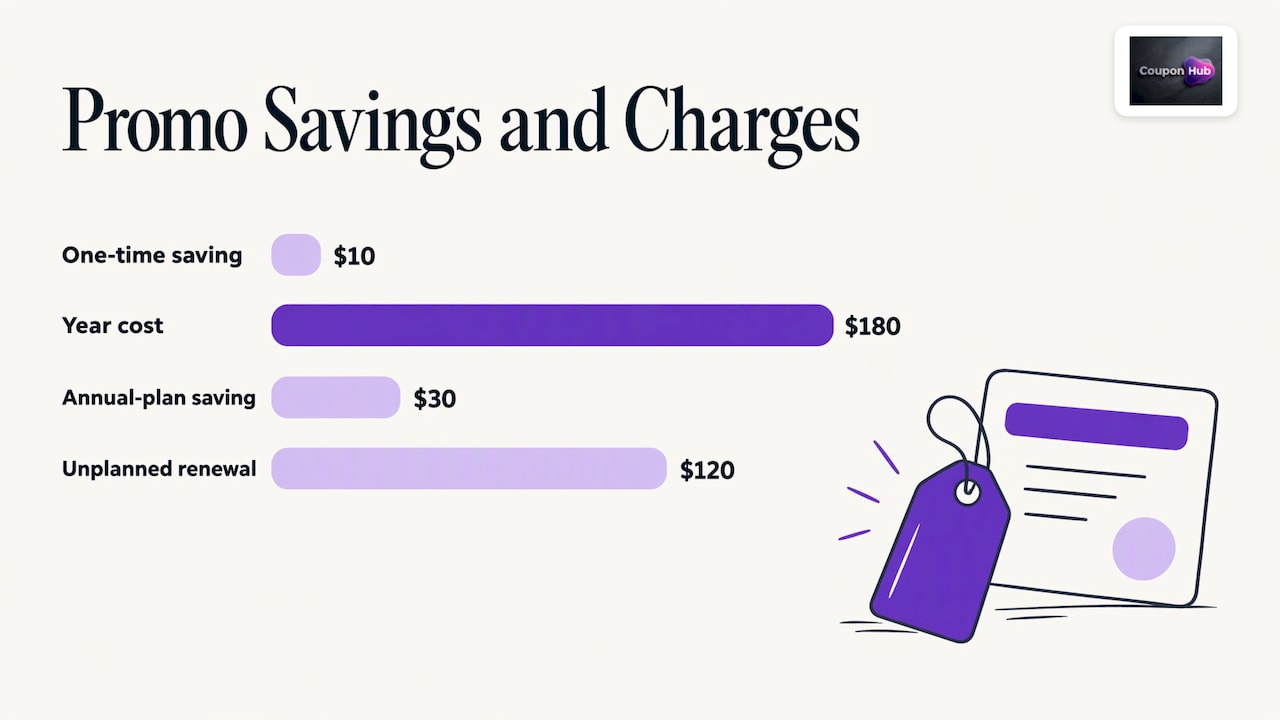
Now compare an annual plan listed at $120 with a code for 25% off the first year. You pay $90 up front and save $30. But if the plan renews at $120 automatically and you no longer use it, the code has cost you a $120 charge you did not plan. The code is only worth using if you would keep the service at the renewal price, or if you will cancel before the deadline. This is the gap between the headline and the threshold, and it is where it stings.
Smart habits for frequent subscribers
- Use a calendar, not memory. Set the reminder for a few days before the cancellation deadline, since some services need notice a day or more ahead.
- Screenshot the offer page. If the checkout total differs from the advertised price, you have something to show support.
- Do not reuse a canceled code. OpenAI says reactivating does not restore the promotional price, and other services limit offers to one per customer.
- Read the full terms when a code reduces a price below normal. Deep discounts are often paired with a commitment.
- Do not expect a code on a gift. Gift memberships and upgrades are often excluded, as the DailyWire+ help page shows.
Where CouponHub fits
If you are signing up for a service, start with the store’s page on CouponHub. We list verified codes across fashion, beauty, technology and many other categories, with the newest additions easy to spot. Our daily coupon picks show fresh offers, and you can browse the full directory by store or category.

While you are here, our free coupon games are a light way to spend a few minutes.
Our perspective
Most frustration with promo codes comes from one gap: the code gets all the attention, and the terms get none. A shopper sees a big number, enters the code and later finds a renewal price, a commitment or an expired window that was in the fine print the whole time.
That is why we verify codes before we publish them. For each one, we check the store, whether the code is valid and what the discount really is. We built CouponHub for shoppers who want something dependable, not a long list of codes that may or may not work.
Our advice for subscriptions is the same as for any purchase: know the renewal price, know the deadline, and confirm the discounted total before you pay. A verified code removes one source of doubt. The terms of the subscription are the other, and they are worth two minutes of your time.
CouponHub Team
FAQ
Do promo codes work on subscriptions?
Yes, but the rules differ by service. Some codes discount only the first payment, some cover a promotional period, and some lock in a lower rate while you stay subscribed. Check the terms next to the offer to see which one applies.
What happens when a subscription promo ends?
In most cases the subscription renews automatically at the standard rate. OpenAI and the New York Times both describe this in their terms, with monthly offers renewing monthly and annual offers renewing annually. Cancel before the deadline if you do not want the full-price charge.
Can I use a promo code again after I cancel?
Usually not. OpenAI says a canceled code cannot be reused and that reactivating does not bring back the promotional price. The New York Times allows only one free trial or promotional rate offer per customer.
Can I use two promo codes on one subscription?
Plan on one. Checkout systems typically accept a single code per transaction, and some services say outright that promotions cannot be combined. A few stores, such as Kohl’s, publish stacking rules, so check the store’s own FAQ.
Why was my code rejected at checkout?
The common causes are expiry, a new-customer-only limit, a different plan or order type than the code covers, or a typing error. If the code was personal to another account, it will not transfer.
Sources
- Stripe: What Is a Promo Code?
- CoinGecko: How to apply a promo code to CoinGecko Premium
- The New York Times: Terms of Sale
- Membership.io: Offer special pricing for founding members
- Klaviyo: What is promo code in marketing?
- OpenAI Help Center: ChatGPT Plus promotions and referrals
- Book of the Month Help Center
- Truth in Advertising: Book of the Month
- Seattle Times: Strategies to find online promo codes that actually work
- DailyWire+ Help Center: How can I use a promo code?
- Kohl’s: Stackable Coupons & Promo Codes
- NerdWallet: How to Find Coupons Fast
- Consumer Reports: How to Find Online Shopping Discount Codes That Work
- Alpha QuickFind: How to Organize Coupons and Gift Cards